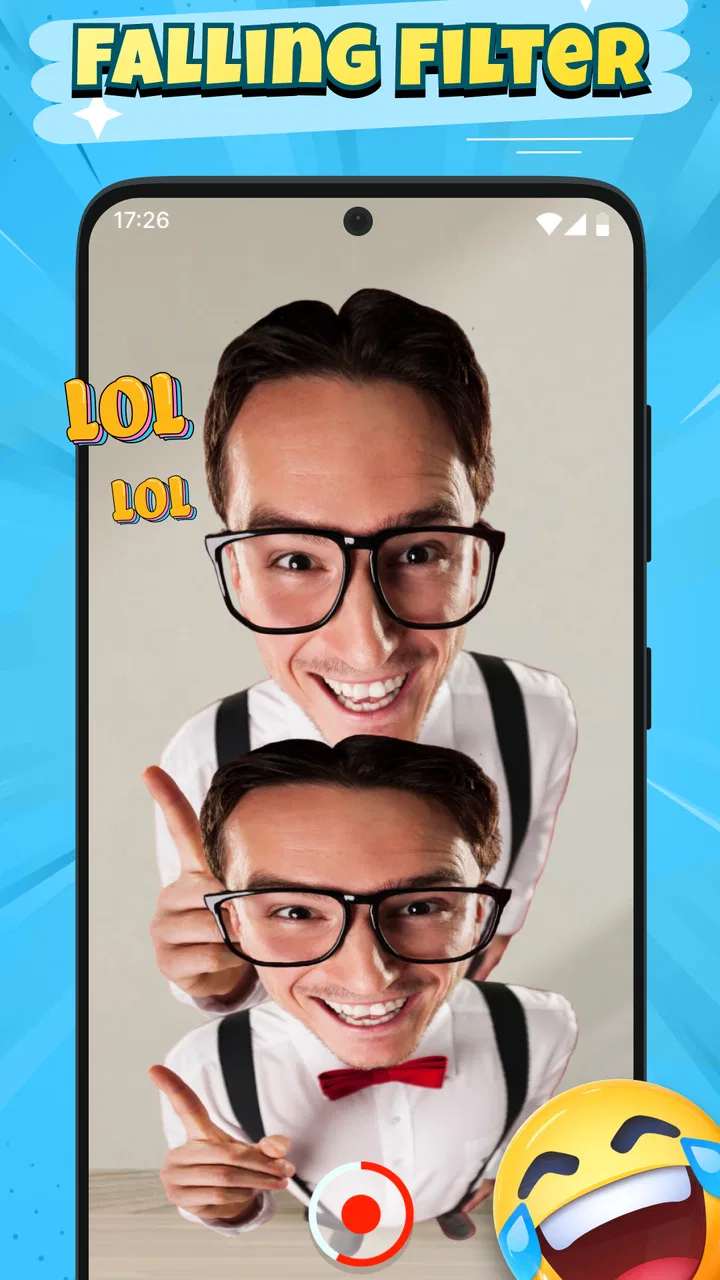
Falling Filter: Loop Me Effect
- 4.2
- Rating
- 1.00M
- Installs
- Free
- Price

 Analysis by App-foxy
The first thing I noticed about Falling Filter: Loop Me Effect is how narrowly it focuses on one visual idea: turning movement into a falling-style loop. It is a photography app from AI Master Lab, and it is best understood as a playful effect tool rather than a complete camera replacement. If you want to make a quick clip feel as though the subject is dropping through the screen, this app gives you a simple place to experiment without asking you to learn a full editing suite.
That narrow purpose is also the key to deciding whether it belongs on your phone. I would recommend it to someone who enjoys short visual jokes, unusual motion effects, and casual social posts. I would not choose it as my main camera, a serious video editor, or a general photo-enhancement app. Its appeal comes from the falling treatment itself, not from a long list of editing controls.
What the falling effect feels like in everyday use
The effect works best when the movement is easy to understand at a glance. A person stepping into frame, a friend pretending to lose balance, a pet jumping, or an object being dropped can all give the loop a clear beginning and end. The more readable the action, the funnier the result tends to feel. Random movement can still be entertaining, but it may look messy rather than intentionally edited.
You May Also Like

 Blood Strike: 2.5 Anniversary
Blood Strike’s Loadouts Turn Every Drop Into a Tactical Gamble
A close look at Blood Strike’s custom loadouts: how fast access to signature weapons reshapes its battle royale rhythm, rewards preparation, and narrows the gap between fights.

 Pandora - Music & Podcasts
Pandora’s Music Is Easy to Start, but Harder to Recover
Pandora’s strength is its low-effort path from a seed to a station. Its weak spot is how much confidence it asks you to place in connection, setup, and quiet recovery.

 8 Ball Pool
 Is Built on Rivalries, Rematches, and Routine
A close look at the rivalries, rematches, shared routines, and unanswered safety questions that turn a quick pool match into a persistent mobile community.

 Samsung Music
’s Quiet Strength Is Playing What You Already Own
Its reach comes less from spectacle than from dependable access to a personal library. That simplicity is both the app’s strongest retention engine and its ceiling.

 AccuWeather: Weather Radar
AccuWeather Review: A Quick, Clear Forecast for Everyday Decisions
For everyday plans, the best forecast is the one you can understand quickly. AccuWeather makes rain timing, radar, and local conditions easy to act on, with a few trade-offs.

 Hill Climb Racing
Why Hill Climb Racing Still Turns Crashes Into One More Run
A tiny car, a bumpy hill and one more upgrade: Hill Climb Racing keeps resurfacing because its simple chaos makes every near-miss feel personal.
More From Our News Desk
View All News


I found that the app’s strongest use is a tiny visual punchline. Imagine filming a friend reaching for a snack and making the motion appear to continue downward in a loop. The finished result does not need a complicated story; the repeated fall is the joke. That makes the app useful for quick messages and casual posts where a full editing timeline would be excessive.
The store presents it as a funny motion filter, and that description points to the right expectation without telling the whole story. This is not an app I would open when I want polished portraits, color correction, background replacement, or a carefully assembled montage. It is more like a single-purpose creative button: you bring the moment, and the falling treatment supplies the twist.
Because the concept is so visual, the surrounding scene matters more than it might with a normal still-photo filter. A plain background can make the motion easier to read. Strong contrast between the subject and the surroundings may also help the falling shape stand out. Busy backgrounds, several people moving at once, or poor timing can make the result harder to understand.
One useful habit is to think about the loop before recording. Instead of waving the phone around and hoping for a funny result, choose one action with a definite beat. A hand dropping out of view, a quick crouch, or a small jump gives the effect something recognizable to repeat. This planning takes only a moment, but it can make the difference between a clip that looks deliberate and one that simply looks unstable.
Starting without overthinking the camera
For a first-time user, I would begin with a short, controlled test rather than trying to capture a perfect scene immediately. Put the phone somewhere steady, keep one subject in view, and perform one simple movement. The goal is not to create a masterpiece on the first attempt; it is to learn how the app interprets motion and how much of the frame it needs.
That approach also makes it easier to separate a problem with the idea from a problem with the recording. If the first result feels confusing, change only one thing on the next try. Keep the action but simplify the background, or keep the background but make the movement slower. Small changes are more informative than changing everything at once.
I would also avoid beginning with a crowded group scene. When several people move in different directions, the falling illusion can lose its subject. A single person or object gives the effect a cleaner target and lets you judge the result fairly. Once that works, you can decide whether adding more activity makes the clip funnier or merely harder to read.
The first successful action
A good first attempt is a friend standing in the middle of the frame, making one exaggerated downward movement while the phone remains as steady as possible. The action should be obvious, not subtle. After viewing the result, look for three things: whether the subject stays visible, whether the falling motion is easy to follow, and whether the loop ends in a way that feels amusing rather than abrupt.
If the result is close but not convincing, the best adjustment is usually performance rather than editing. Make the movement broader, leave more space around the subject, and repeat it with a consistent rhythm. This is one of the app’s interesting trade-offs: the tool is simple, but the person in front of the camera still has to perform for the effect.
For an everyday example, I could use it while waiting with a friend at a café. Rather than filming a long conversation, I would capture a quick moment in which the friend dramatically reaches toward a pastry and “falls” out of the action. The clip would be short, understandable, and easy to send. That is where this app feels more practical than a traditional editor: the idea can be made in the moment, without turning a small joke into a production.
Another worthwhile experiment is using an inanimate object. A soft toy, a hat, or a lightweight item moving through the frame can produce a cleaner test than a person because there are fewer unpredictable gestures. This is also a useful way to learn the effect privately before recording something you intend to share.
Where new users may get confused
The biggest possible misunderstanding is expecting a complete editing workspace. The name and store description point toward a falling filter, not a broad collection of professional tools. If you are looking for detailed trimming, layered sound design, advanced transitions, or precise manual control, you may find the experience too focused. The app’s value is speed and novelty, not depth.
Another common mistake is judging the effect from a badly framed action. If the subject begins at the edge of the screen or disappears too quickly, the loop may feel accidental. Keep the main action inside the frame and give it enough visual space. A little empty room around the subject is often more useful than filling every corner with scenery.
It is also easy to confuse a funny concept with a funny result. The falling idea can make an ordinary moment more playful, but it cannot automatically create timing, expression, or a punchline. I would treat the filter as the final ingredient in a small visual gag. Decide what the viewer should notice first, then use the effect to reinforce that moment.
Users who normally rely on polished camera apps may notice the difference immediately. A standard photography app is better when the goal is accurate exposure, sharp still images, or natural-looking portraits. A conventional video editor is better when you need to control several clips and refine the final sequence. Falling Filter has an advantage only when the falling loop is the main reason for opening the app.
That comparison is important because the app is free, but free does not mean suitable for every photography task. I would happily keep it for spontaneous experiments, yet I would still use another tool for an important event, a product photo, or a video that needs careful pacing. Choosing it for the right job prevents disappointment.
Practical ways to get more from one effect
My first tip is to record variations instead of repeating the exact same attempt. Try one version with a slow, exaggerated movement and another with a sudden drop. The slower take may be easier to understand, while the faster one may feel more surprising. Comparing them teaches you how the effect responds without requiring technical settings.
My second tip is to use the background as part of the joke. A staircase, a doorway, or a clear wall can make the direction of the fall feel intentional. This is not about finding a spectacular location; it is about giving the viewer a visual reference. A stable background can make the moving subject appear more dramatic.
My third tip is to leave a little time before and after the main action. Starting the recording too close to the movement can make the loop feel clipped, while ending immediately can remove the setup that makes the gag understandable. Even a brief pause can help the viewer recognize what is happening before the motion repeats.
A fourth useful workflow is to test the effect with the phone held at the same angle you expect to use when sharing the result. A vertical composition suits a person dropping through a tall frame, while a wider scene may be better for an object moving sideways before the falling illusion takes over. The right orientation depends on the action, so it is worth deciding before recording rather than trying to rescue the composition afterward.
There is also a trade-off between realism and comedy. If you want the movement to look natural, use a restrained gesture and a calm setting. If you want an obvious joke, exaggerate the pose and choose a reaction that viewers can read instantly. The app can support both approaches, but it does not decide the tone for you.
Who should install it, and who should skip it
I think this app is a good fit for people who enjoy experimenting with short-form visual effects, especially users who want a quick result rather than a long editing session. It can also suit families and friends looking for a harmless way to turn ordinary moments into playful clips. Its Everyone content rating makes that audience easier to understand, although the quality of the result still depends on the scene and the person using it.
It is less suitable for photographers who mainly capture still images, travelers who want a broad camera toolkit, or creators who need fine control over every frame. If your priority is a polished final video with multiple layers, a dedicated editor will be the better choice. If your priority is a natural portrait, a conventional camera app will make more sense. The narrow focus is a strength only when it matches your intention.
The app is free, which lowers the barrier to trying it for a few minutes. It has reached over a million installs and holds a 4.5 average from around two thousand ratings, so there is clear interest in the idea. I would still treat those figures as a reason to explore, not as a guarantee that every recording will work perfectly. A novelty effect depends heavily on timing, framing, and the kind of motion you provide.
Device details and the decision to keep it
Falling Filter: Loop Me Effect is currently at version 1.0.1 and requires Android 9 or later. That makes the operating-system requirement worth checking before installation, especially if you are using an older phone. On a compatible device, I would give it a quick trial with a simple subject rather than deciding from the store page alone.
AI Master Lab released the app on January 6, 2026, so I would approach it as a focused, relatively new creative tool rather than a mature replacement for every photography app. The practical question is not whether it can do everything; it clearly is not designed for that. The question is whether you regularly have moments that would benefit from a repeated falling gag.
After the first successful clip, the next step is to develop a small personal routine. Keep the camera steady, choose one clear action, simplify the background, and make two or three variations. Then save the version whose loop reads most quickly. This process is more reliable than chasing a complicated scene, and it helps you learn what kind of movement suits the effect.
I would also decide in advance where the finished clip is going. A private message can be rougher and more spontaneous, while a public post may need cleaner framing and a more obvious setup. That choice affects how much time you should spend on retakes. The app makes experimentation easy, but it does not remove the need to match the recording to its audience.
My final view is straightforward: this is a fun specialist tool with a clear personality. Use it when the falling loop is the joke, not when you need a complete photography studio. For a first-time user, the path to a meaningful result is reassuringly simple: choose one subject, keep the movement readable, frame it cleanly, and let the effect do its one distinctive job. If that sounds like the kind of visual play you enjoy, the free download is worth trying. If you want broad editing control or natural-looking photography, I would skip it and use a more conventional camera or video editor instead.
FAQs for Falling Filter: Loop Me Effect
01What is Falling Filter: Loop Me Effect?
Falling Filter: Loop Me Effect is a creative photo and video editing app that allows users to apply dynamic filters and looping effects to their media. The app is designed for both casual users and social media enthusiasts who want to enhance their content with unique visual effects.
02How easy is it to use Falling Filter: Loop Me Effect?
The app is user-friendly and intuitive, with a straightforward interface that guides users through the editing process. It offers tutorials and tips for beginners, making it accessible regardless of your experience level with editing apps. Advanced users can also enjoy customization options for more detailed edits.
03Does Falling Filter: Loop Me Effect require an internet connection?
While the app can be used offline for basic editing functionalities, some features like downloading new filters or sharing your creations directly to social media platforms might require an internet connection. It's advisable to have access to Wi-Fi or mobile data for the best experience.
04Are there in-app purchases or ads in Falling Filter: Loop Me Effect?
Yes, Falling Filter: Loop Me Effect includes in-app purchases that unlock premium filters and effects. The free version may have ads, but users can opt for a subscription or one-time purchase to remove them and gain access to exclusive content and features.
05What devices are compatible with Falling Filter: Loop Me Effect?
Falling Filter: Loop Me Effect is available for both Android and iOS devices. It supports a wide range of smartphones and tablets, but for optimal performance, it's recommended to use devices running the latest operating systems with sufficient processing power and storage space.
Pros
- Intuitive interface for easy use.
- Wide range of filters available.
- High-quality video export options.
- Regular updates with new features.
- Minimal ads for a smoother experience.
Cons
- Limited free features without subscription.
- Occasional crashes on older devices.
- Slow rendering on low-end phones.
- Requires constant internet connection.
- Large file size post-installation.

Falling Filter: Loop Me Effect
Gallery